Ziplines and Slides
Ziplines and slides let players ride along an authored path. They use the same path pieces as elevators and path movers, but the moving thing is the player instead of a platform.
Tool Pieces
-
Owns the route the player follows
-
Mark the route points for the ride
-
Lets players mount, ride, release, and complete the path
Player Path Ride
TTT Player Path Ride lets a player press Use near a path and ride toward an endpoint. Use it for ziplines, slides, rails, tubes, and guided movement where the player should move along a path rather than standing on a moving platform.
Zipline and slide share the same ride system
Zipline and Slide use the same movement behavior, but the setting applies the expected default player-origin offset for that style of ride.
Setup
- Create a
TTT Path Trackfor the route. - Add
TTT Path Pointobjects along the route. - Keep the path open; player rides need a start and end, not a closed loop.
- Add
TTT Player Path Rideto the visible ride object or interaction helper. - Make sure the object players press Use on has a collider or helper volume.
- Assign
Trackdirectly, or setTrack Name. - Choose
KindandPath Mode. - Set
Move Speed,Mount Distance, and release behavior. - Test mounting from the intended approach angles.
Path Modes
| Mode | Use |
|---|---|
Ride Line |
The authored path represents a visible cable, rail, or slide line. The player origin is offset from that line. Best for ziplines and most slides. |
Player Origin |
The authored path represents the player's origin directly. Only use this if you have no concerns about the player colliding at all. |
| Kind | Default Offset | Use |
|---|---|---|
Zipline |
0, 0, -80 |
Authors the path on the visible cable and places the player's feet below it with a little clearance above the player hull. |
Slide |
0, 0, 2 |
Authors the path on or just above the slide surface and keeps the player origin slightly above it. |
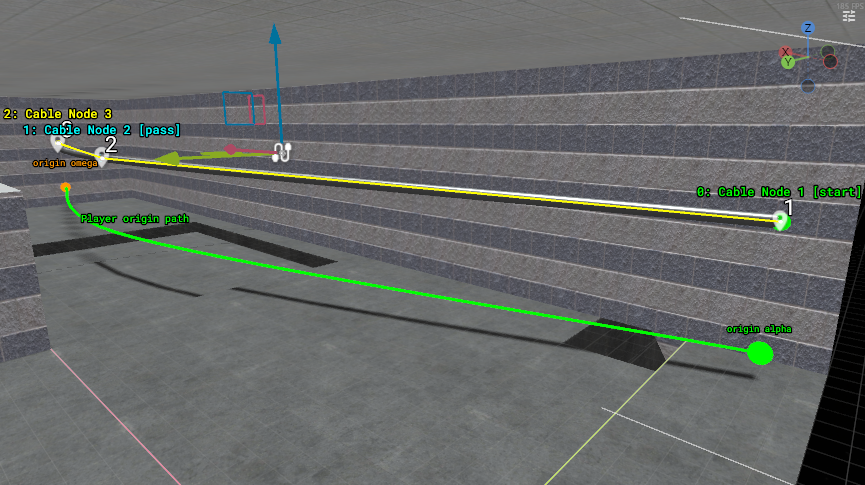
Why are there 2 paths?
Ride Line Origin Offset controls how far the player's origin sits from the visible cable, rail, or slide line when using Ride Line. The green editor preview shows the actual player-origin path.
The reasons why it's like this are twofold:
- So that you can author a zipline or slide path in the way they'll appear in the actual world, then adjust the offset so that they're hanging below the path (or to the side, or however you want).
- Collisions with static geometry while riding are what you want to avoid. If the player is consistently colliding with the floor or ceiling, it gets stuttery and ugly in the physics world.
Account for the player collider
For ziplines, either offset the player enough to avoid repeated collisions or don't use a solid cable as the path they ride. If the cable or helper collision overlaps the player hull repeatedly, riders can stutter while the controller corrects the collision (this is why the offset is -80 as opposed to the player's exact collider height, -72). Use a non-blocking interaction helper when possible, or give the cable enough clearance from the green player-origin path.
For slides, solid geometry is obviously expected. Keep the green origin path slightly above the slide surface, avoid routing it into walls or sharp lips, and test steep sections plus the landing area. If riders should stay committed to the chute, turn Allow Release off.
Useful Options
| Option | Use |
|---|---|
Kind |
Labels the ride as Zipline or Slide and chooses the default ride-line offset. |
Bidirectional |
Riders choose the far endpoint from their current path position. Disabled means every ride travels toward the final endpoint. |
Move Speed |
Travel speed along the path. |
Movement Curve |
Controls progress over the full ride. |
Mount Distance |
Maximum distance from the effective player-origin path where direct use can mount the ride. |
Mount Settle Seconds |
Smooths the player onto the path after mounting slightly off-line. |
Completion Velocity Scale |
Velocity multiplier when a rider reaches the endpoint. Set to 0 to slow endpoint exits. |
External Impulse Cancel Speed |
A strong outside velocity change can knock the rider loose. Set to 0 to disable that cancel. |
Allow Direct Use |
Lets players press Use to mount. |
Allow Release |
Lets players press Use again to let go early. |
Starts Locked |
Starts locked until it receives Unlock. |
Inputs And Outputs
| Input | Behavior |
|---|---|
Lock / Unlock |
Prevents or allows direct use. |
Reset |
Restores locked state and cancels current ride generation. |
| Output | Use |
|---|---|
Targets On Started |
Fires when a player starts riding. |
Targets On Completed |
Fires when a rider reaches the endpoint. |
Targets On Released |
Fires when a rider lets go. |
Targets On Canceled |
Fires when a ride is interrupted by lock/reset, invalid state, player collision, or a strong external impulse. |
Targets On Locked / Targets On Unlocked |
Fires when the ride is locked or unlocked. |
Common Patterns
| Pattern | Setup |
|---|---|
| One-way zipline | Open path, Path Mode = Ride Line, Bidirectional off. |
| Two-way cable | Open path, Bidirectional on, mountable from both ends. |
| Water-slide chute | Kind = Slide, Path Mode = Ride Line, Allow Release off, with the green origin preview slightly above the slide surface. |
| Exact body path | Use Player Origin when the path should describe the player's body position directly. |
| Locked traitor escape | Start locked, unlock from a role button or other traitor-only map logic. |
Collision And Mounting
The Use prompt comes from the object or helper volume the player is aiming at. Mount Distance only controls whether the player is close enough to the effective ride path after that Use target is found.
Testing Checklist
- Test mounting from every place players are expected to press Use.
- Make sure the path is not a closed loop.
- Test release behavior if
Allow Releaseis enabled. - Check endpoint velocity so players do not launch into walls or stop too abruptly.
- Watch the green player-origin preview against nearby solid geometry.
- Test with several players trying to use the ride close together.
- Run a round reset and confirm locked state and active rides recover cleanly.