Movement
Simple Travel
Players can traverse your map in a variety of different ways besides just walking, depending on the situation.
Ladders
Ladders are any solid collider with the ladder tag on it. It doesn't need to look like a ladder or even be visible at all, so you can get creative about what players are able to climb on- as long as they're touching a solid collision object with the ladder tag, they'll climb.
The ladder climb speed on the player is 155, but ladder movement scales that internally. In practice, ladder movement can reach about 287 units/s along the ladder, and holding crouch slides the player down faster. With a bit of skill and timing, strafing off of a ladder can launch you further away and higher than one might otherwise expect.
Placement
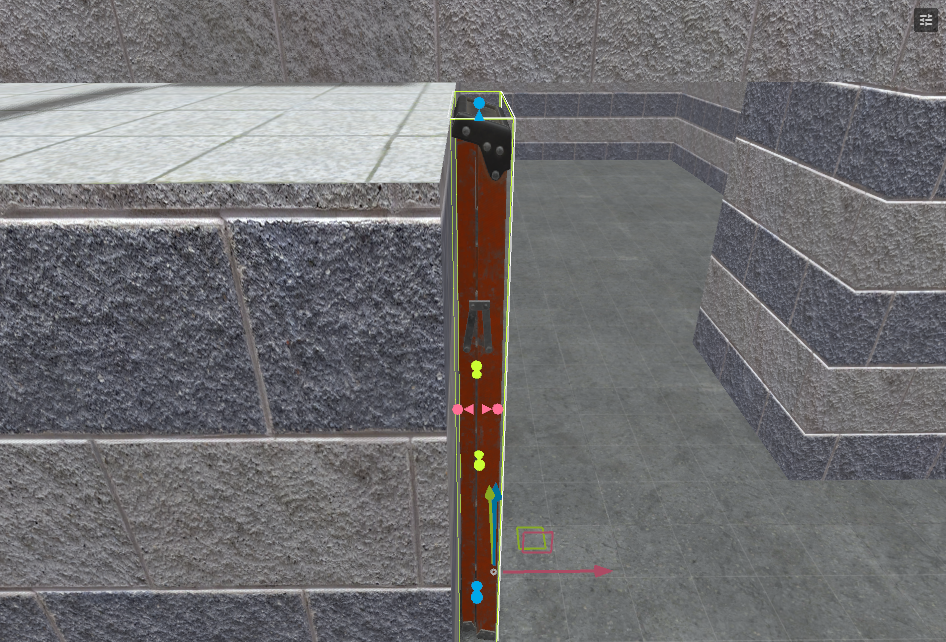
Make sure the ladder is flush with the floor/wall it is up against in many cases. The collider being slightly above the floor at the top or if there is a gap between it and the wall will cause weird bumps, jumps and stuttering for players. It's OK for it to be partially inside a wall, though. If you're using a model, it may be easiest to just remove or disable the ModelCollider and add a BoxCollider to fine-tune the shape.
Water
Water is any trigger collider with the water tag on it. Ideally it looks like water, but maybe it doesn't- it's up to you. A player is considered swimming once more than half of their controller height is in water, and underwater once more than 90% is submerged. Swimming uses the current wish speed scaled by 0.8x; pressing jump swims upward, and doing nothing slowly sinks the player. Players that spend too much time underwater will begin to drown, which damages them at a fixed rate until they get back above water or die.
Placement
Make sure that the top of the collider is the same height as the top face of your water material. Also ensure the bottom of the collider covers any ground surfaces where players could stand- if there is enough gap at the bottom, players will be able to walk without being considered underwater, which could lead to exploits or cheese.
Advanced Travel
Teleporters
Teleporters make use of the MapTriggerTeleport component to warp a player to a different location on the map. Adding the component to an empty GameObject will automatically include a trigger BoxCollider, which you can then resize to cover the area that should teleport the player entering.
To choose where to send the player, create another empty GameObject and place it where the teleported player's feet should arrive, then set the Destination field with either the dropper tool or by exact name of the GameObject. You can also mark another existing GameObject with a teleporter component on it to link the two together.
Safety
Teleporters try to place the player safely at the destination. If the destination is missing or blocked, the teleporter will fail instead of trapping the player inside geometry. Reentry Cooldown Seconds prevents the same player from immediately bouncing back and forth between chained teleport triggers. The default value is short, but it's usually enough for paired teleporters. If you want to limit how quickly players can file into a teleporter, it can be used for things like that as well.
Trigger Push
A trigger collider that applies force to players, as well as objects inside of it. This is how players float up through the vent on maps like Dolls.
What this moves is up to you. The default tags that this will interact with include a few TTT objects like props and corpses, but if you only want this to affect the player, you can remove them.
TriggerPush can be authored with any direction or amount of force applied, so this component is super varied in potential application and is absolutely not limited to wind tunnels. Some fun examples that come to mind are low-gravity zones in a space station, river rapids, or I/O activated decompression trying to suck players out of an airplane cabin. Maybe a huge fan or magnet trap pushing/pulling players off a building? Lot of creative wiggle room here!
Ziplines & Slides
FuncPlayerPathRide, PathPoint and PathTrack can be used to indicate where players can ride a zipline or slide. More on setting them up in Ziplines and Slides. These are different options on the same component that are set up the same way, but behave slightly differently.
Authoring checklist
- Test movement features as both host and client when possible.
- Make sure destinations and moving platforms are safe for several players at once.
- Check what happens when a player dies, disconnects, or drops a weapon while the movement feature is active.
- Run a full round reset after every movement feature has been used.
- Prefer clear target names for moving objects and destinations.
Movement features need failure cases
A teleporter, elevator, water exit, or push trigger should still behave well when players enter it at strange angles, hold props, block each other, or activate it repeatedly.