Tools
To author any kind of tool, start by placing a GameObject into the scene.
Mapping tool components
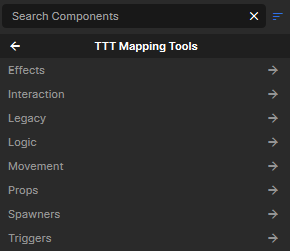
Add the component you want either by searching for it by name or selecting it from the TTT Mapping Tools category in the dropdown list. Some components are meant to be placed directly, while others are support pieces used by another tool.
Current Tool Pages
-
Player-use buttons, role-gated trap buttons, and button outputs
-
Trigger volumes that check roles and drive tester indicators
-
Enable targets, disable targets, and count repeated signals
-
Rotating doors, sliding doors, door inputs, and double-door patterns
-
Two-position movers for panels, shutters, lifts, gates, and traps
-
Path tracks, path points, elevators, call buttons, and moving platforms
-
Player ride paths for ziplines, slides, and guided traversal
-
Trigger boxes, teleport volumes, and push volumes
-
Hurt volumes, damage surfaces, break outputs, and glass
-
Explosive props, explosion targets, and barrel setup
-
Spawn objects, consume props, and build simple item logic
Choosing Movement Tools
| Goal | Start with |
|---|---|
| Hinged door, double door, rotating panel | Doors |
| Sliding door, shutter, two-state lift, trap panel | Linear Movers |
| Elevator, tram, train, multi-stop platform | Elevators and Path Movers |
| Zipline, slide, player-only ride path | Ziplines and Slides |
Use the smallest tool that matches the behavior
A two-position object usually wants a door or linear mover. A route, elevator, or multi-stop object usually wants a path mover. A player-only ride path usually wants a zipline or slide. That split keeps the setup readable and makes round reset behavior easier to test.
Choosing Interaction Tools
| Goal | Start with |
|---|---|
| Player presses something in the world | Buttons and Role Buttons |
| Traitordetecting tester setup | Role Testers |
| Turn another object on or off | State and Logic |
| Wait for several signals before firing | State and Logic |
| Detect players entering, leaving, or occupying an area | Triggers |
| Move players instantly or push them through space | Triggers |
Choosing Hazard and Object Tools
| Goal | Start with |
|---|---|
| Hurt players in a volume or on a surface | Damage and Breakables |
| Fire outputs when a prop breaks | Damage and Breakables |
| Make breakable glass | Damage and Breakables |
| Place an explosive barrel or invisible explosion | Explosives |
| Spawn a reward, weapon, prefab, or trap object | Object Tools |
| Consume props dropped into a target area | Object Tools |