Buttons and Role Buttons
Buttons are map I/O senders. Use them when a player should press something to activate another object's behavior: opening a door, setting off a trap, turning on a traitor tester, triggering an explosion, or run any other authored map action.
Which Button To Use
-
A typical world object that players look at and press
-
A button shown to a specific role from a distance
TTT Button
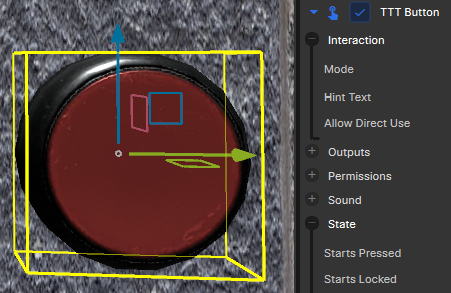
TTT Button lives on a GameObject in the world. It can be directly used by players, be driven by incoming map I/O, or both.
Setup
- Add a GameObject for the visible button, invisible button volume, or logic-only control.
- Add the
TTT Buttoncomponent. - Choose a
Mode. - Wire
Targets On Pressedfor the normal button action. - Set a target, target name, or target tag on each map link.
- Set the map link
Inputonly when the receiver needs a specific command such asToggle,Open,Close,Start,Stop,Lock, orUnlock.
Direct use requires a collider
Regular buttons need a collider for players to press them. This will usually just be a model's, but it can take any shape, size or appearance you like, including being invisible. All that typically means is ensuring IsTrigger is not checked.
Modes
| Mode | Behavior |
|---|---|
Press |
Fires when used, then optionally returns after Reset Time. |
Hold |
Fires its activation output after the player holds use for Hold Seconds. |
Toggle |
Flips between on and off each time it is used. |
Outputs
| Output | Use |
|---|---|
Targets On Pressed |
Main output for most buttons. It sends Activate by default so generic receivers work without extra setup. |
Targets On Activated |
Compatibility output. Useful when you specifically want Hold mode to wait for Hold Seconds. |
Targets On Toggled On |
Toggle-only output. Sends Start by default. |
Targets On Toggled Off |
Toggle-only output. Sends Stop by default. |
Targets On Released |
Fires immediately when the button is released or logically releases. |
Targets On Locked / Targets On Unlocked |
Fires immediately when the button is locked or unlocked. |
Fire Delay Seconds delays the accepted action outputs: pressed, activated, toggled on, and toggled off. Release and lock outputs are immediate. Each map link can still add its own Delay Seconds.
Interaction
Allow Direct Use controls whether players can press the button directly. Disabled buttons can still react to incoming map I/O.
Hint Text overrides the player-facing prompt. If left as the default, the prompt reflects the button mode and state, such as Hold, Turn On, Turn Off, or Locked.
Starts Pressed sets the round-start state. Starts Locked blocks direct use and activation inputs until the button receives Unlock.
Movement And Sound
Enable Move when the object should physically press in. Move Delta is local-space movement from the authored rest position. The opening and closing duration, movement curves, and sounds control the press and return animation.
Disable Move for invisible triggers, panels whose animation is handled elsewhere, or purely logical buttons.
TTT Role Button
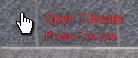
TTT Role Button is for role-gated world-space controls, usually used for traitor-only stuff. It is visible and usable only to players matching its configured role and doesn't need a physical representation in the world.
Setup
- Add a GameObject at the button position.
- Add the
TTT Role Buttoncomponent. - Set
Role Nameif needed. It defaults toTraitor. - Set
Description; this is the main label players see ("Open T Room" in the image above). - Set
Radiusto control how far away the role can see and use it. - Wire
Targets On Activatedto the trap, door, or any other receiver.
Behavior
Role buttons fire Targets On Activated when a permitted player successfully uses them. Leave a map link input blank for normal Activate behavior, or set a specific receiver input when needed.
Remove On Use makes the role button single-use until the map resets. Starts Locked, Lock, and Unlock can hide or restore the button during the round.
Role buttons and explosive props
If you're putting a role button on the same prop that will blow up when it is activated, make sure Remove On Use is selected. Otherwise, the button will stick around and do nothing when pressed.
Common Patterns
| Pattern | Wiring |
|---|---|
| Button opens a door | Targets On Pressed to the door, blank input or Open. |
| Button toggles a door | Targets On Pressed to the door, input Toggle. |
| Toggle button drives lights | Targets On Toggled On to the light target with Start; Targets On Toggled Off with Stop. |
| Traitor trap button | TTT Role Button with Role Name set to Traitor, Targets On Activated to the trap receiver. |
Networking
Keep button objects on the default map-tool networking setup unless a specific tool page says otherwise.